Open Picture Window Fever! v4.01
This behavior opens up a new window to the exact dimensions
of the image it contains.
It's great for providing larger versions of thumbnails in a new window,
and it will save you having to create a new html document for each large
picture you want to display.
What's more, the popup window will close itself as soon as the user clicks away, so it avoids alienating users by filling their desktop with unwanted browser windows.
I think its use is fairly self explanatory, but lets look at what each field does:
Description of the fields
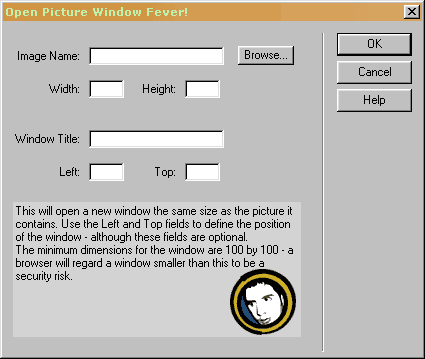
Image Name is the name of the image to be contained
in the window. You can use the Browse button to find the file on your
computer, or you can just type the name straight in.
This box must not be left blank.
Width is the number of pixels wide that your image is. You will be able to find this out from your graphics package. In Macromedia Fireworks, Modify -> Image Size will give you this information. In Adobe Photoshop, it's Image -> Image Size. This box must not be left blank.
Height is the number of pixels high that your image is. You will be able to find this out from your graphics package. In Macromedia Fireworks, Modify -> Image Size will give you this information. In Adobe Photoshop, it's Image -> Image Size. This box must not be left blank.
Window Title is the name which will appear in the title bar of the new window. It is also used as the ALT attribute for the image. This box must not be left blank.
Left is the number of pixels from the left hand side of the screen that the new window will open. This is optional. If you leave Left and Top blank, then the browser will open the new window in the default location. New to Version 2!
Top is the number of pixels from the top of the screen that the new window will open. This is optional. If you leave Left and Top blank, then the browser will open the new window in the default location. New to Version 2!
